DBCC TRACEON / DBCC TRACEOFF/ DBCC TRACESTATUS
DBCC TRACEON - Enable trace flags.
DBCC TRACEOFF - Disable trace flags.
DBCC TRACESTATUS - Display the status of trace flags.
--> Turn flag on for only the session level
DBCC TRACEON (1222)
DBCC TRACEON (1205,1222)
GO
--> Turn flag on globally at server for all the sessions
DBCC TRACEON (1222, -1)
GO
-- >Turn flag off
DBCC TRACEOFF (1222);
GO
--> Show flag status
DBCC TRACESTATUS (1205,1222)
DBCC TRACESTATUS (-1)
Thursday, December 17, 2009


Login failed for user 'sa' because the account is currently locked out. The system administrator can unlock it.
Error Description
Login failed for user 'sa' because the account is currently locked out. The system administrator can unlock it.
Root Cause
SQL Account only locked out, if it is enfoced to use password policies.

Resolution
You can unlock it by exeuction below command.
ALTER LOGIN sa WITH PASSWORD = 'password' UNLOCK
OR
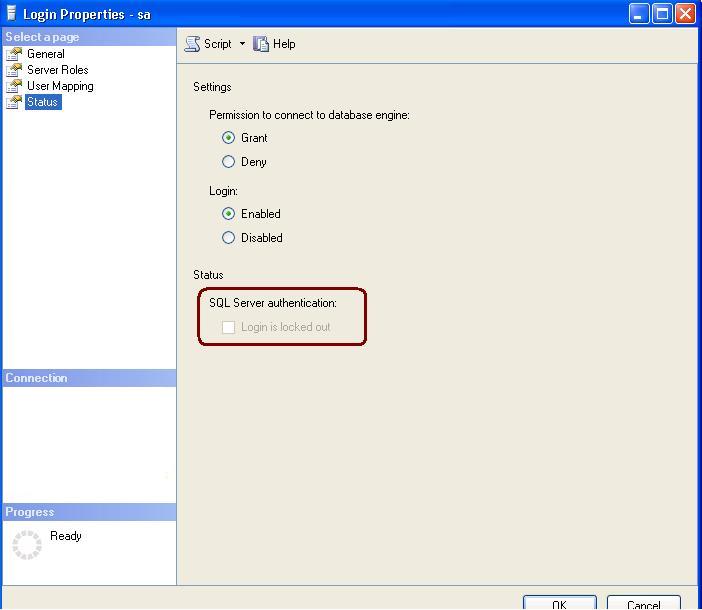
You can do it GUI as well by unchecked locked checkbox

Login failed for user 'sa' because the account is currently locked out. The system administrator can unlock it.
Root Cause
SQL Account only locked out, if it is enfoced to use password policies.

Resolution
You can unlock it by exeuction below command.
ALTER LOGIN sa WITH PASSWORD = 'password' UNLOCK
OR
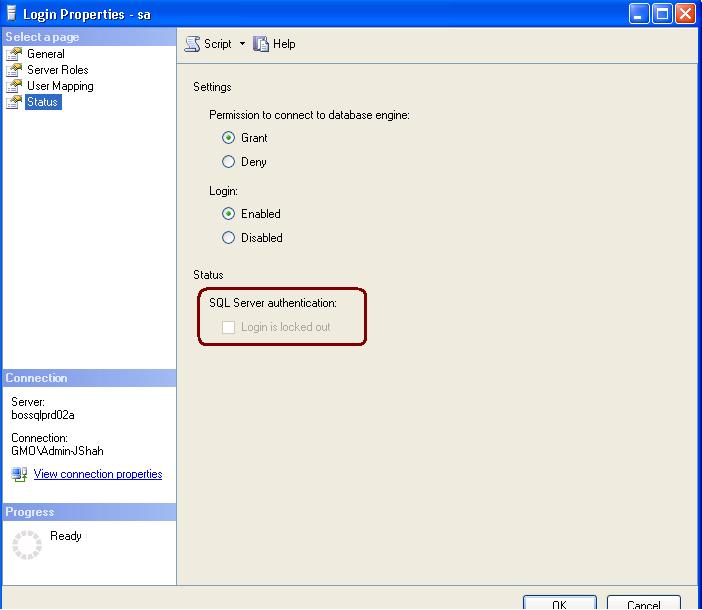
You can do it GUI as well by unchecked locked checkbox
Wednesday, December 16, 2009
Saturday, December 12, 2009
Index Rebuild vs Index Reorganize. Diffrence beweent Index Rebuild and Index Reorganize
| Index Rebuild | Index Reorganize |
| It is offline operation | It is online operation |
| Option is available in all SQL Server 2005 edition | Option is available in SQL Server 2005 Enterprise and Developer edition only |
| Index rebuilds works by re-creating the index internally again and when that has been achieved, it drops the existing index. | Index reorganize is the process of physically re-organizing the leaf nodes of the index |
| Index rebuild need more log space so it is advisable to change the database recovery model Simple or Bulk-logged | Reorganize swaps one page with another and thus does not require free space for this operation like rebuild does. Infect, reorganize can free up some pages as it does the reorganize in two phases – compaction and defrag. A reorganize can remove almost all of the logical fragmentation but it cannot necessarily fix extent fragmentation in which the previous and the next extents are physically contiguous. |
| During the index rebuild process, It will also re-compute index statistics | Reorganize on the other hand does not update the statistics |
| Can be done on any data type column because it is offline operation. | Another point to note is that an index (clustered or non-clustered) cannot be built online if it contains LOB data (text, ntext, varchar(max), nvarchar(max), varbinary(max), image and xml data type columns). |
| If you want to rebuild an index with multiple partitions in an online environment, you need to rebuild the entire index which means rebuilding all the partitions. | Regarding partitions of an index, if an index has multiple partitions, then you cannot rebuild a single partition online. You can reorganize a single index partition online |
USE AdventureWorks;GOALTER INDEX ALL ON Production.Product REBUILDGO | USE AdventureWorks;GOALTER INDEX ALL ON Production.Product REORGANIZE |
| Index should be rebuild when index fragmentation is great than 40%. | Index should be reorganized when index fragmentation is between 10% to 40% |
| ONLINE option will not keep index available during the rebuilding. | ONLINE option will keep index available during the rebuilding. |
How to check SQL Services status from management studio?
You can use the below commands to check the sql services status from manangement studio.
xp_servicecontrol querystate, MSSQLAgent
xp_servicecontrol querystate, MSSQLServer
xp_servicecontrol querystate, msdtc
xp_servicecontrol querystate, MSSQLAgent
xp_servicecontrol querystate, MSSQLServer
xp_servicecontrol querystate, msdtc
Saturday, November 28, 2009
Join me on SQLPass.Org
Dear Readers,
You can join me on SQLPass

http://www.sqlpass.org/Community/PASSPort.aspx?ProfileID=42686
You can join me on SQLPass

http://www.sqlpass.org/Community/PASSPort.aspx?ProfileID=42686
Thursday, November 26, 2009
Service Principle Name
SPN (Service Principle Name)
What is SPN? A service principal name (SPN) is the name by which a client uniquely identifies an instance of a service. The Kerberos authentication service can use an SPN to authenticate a service. When a client wants to connect to a service, it locates an instance of the service, composes an SPN for that instance, connects to the service, and presents the SPN for the service to authenticate.
How the SPN works or what is the internal process of SQL Server to register SPN?When SQL Server service is started, it first checks if SPN exists and if no SPN found calls API to create new SPN. At the shutdown service sends request to delete the SPN.
What if SQL Server is running under local administrator account? Can it register SPN?No, it cannot. The account must have domain administrator rights to register the SPN
Can we register SPN for other services as well? Yes, you can register the SPN for the other services as well. (i.e Analysis Service)
How can I see the SPN for my different SQL Boxes? First you need to download the SPN tool from below URL http://www.microsoft.com/downloads/details.aspx?FamilyId=6EC50B78-8BE1-4E81-B3BE-4E7AC4F0912D&displaylang=en
How to use this utility, what are the commands available for it?Please find the SPN Syntax as below.
Syntax setspn [switches data] computername
Note: Computer Name can be the name or domain\name
Switches:
-R = reset HOST ServicePrincipalName
Usage: setspn -R computername
-A = add arbitrary SPN
Usage: setspn -A SPN computername
-D = delete arbitrary SPN
Usage: setspn -D SPN computername
-L = list registered SPNs
Usage: setspn [-L] computername
Examples:
setspn -R daserver1
It will register SPN “HOST/daserver1 and “HOST/{DNS of daserver1}”
setspn -A http/daserver daserver1
It will register SPN “http/daserver” for computer “daserver1”
setspn -D http/daserver daserver1
It will delete SPN “http/daserver” for computer “daserver1”
How should I use this utility SQL Server Services?You can use below commands to register different services
To Register SQL Server Database Service
SetSPN –A MSSQLSvc/serverHostName.Fully_Qualified_domainName:[TCP Port Number] [Account Name]
Note: You can use the same command Named Instance as well
To Register Analysis Service
Setspn.exe -A MSOLAPSvc.3/serverHostName.Fully_Qualified_domainName OLAP_Service_Startup_Account
How to check whether SQL Server Services are registered or not?
You can use below command.
SetSPN –L [AccountName]
What happens if SQL Server Service fails to create SPN during startup?
If the SQL Server Service is failed to create and register SPN, it will log the error in the error log during startup. Moreover you will get the below type of issues from client side
You will get the connectivity issues from client side as below
How to check after SPN registration SQL Server Kerberos authentication?
Check the auth_scheme column by executing below query
select auth_scheme from sys.dm_exec_connections where session_id=@@spid;
What are the best practices for SPN in cluster environment? In cluster server configure both nodes to use same network DC
What is SPN? A service principal name (SPN) is the name by which a client uniquely identifies an instance of a service. The Kerberos authentication service can use an SPN to authenticate a service. When a client wants to connect to a service, it locates an instance of the service, composes an SPN for that instance, connects to the service, and presents the SPN for the service to authenticate.
How the SPN works or what is the internal process of SQL Server to register SPN?When SQL Server service is started, it first checks if SPN exists and if no SPN found calls API to create new SPN. At the shutdown service sends request to delete the SPN.
What if SQL Server is running under local administrator account? Can it register SPN?No, it cannot. The account must have domain administrator rights to register the SPN
Can we register SPN for other services as well? Yes, you can register the SPN for the other services as well. (i.e Analysis Service)
How can I see the SPN for my different SQL Boxes? First you need to download the SPN tool from below URL http://www.microsoft.com/downloads/details.aspx?FamilyId=6EC50B78-8BE1-4E81-B3BE-4E7AC4F0912D&displaylang=en
How to use this utility, what are the commands available for it?Please find the SPN Syntax as below.
Syntax setspn [switches data] computername
Note: Computer Name can be the name or domain\name
Switches:
-R = reset HOST ServicePrincipalName
Usage: setspn -R computername
-A = add arbitrary SPN
Usage: setspn -A SPN computername
-D = delete arbitrary SPN
Usage: setspn -D SPN computername
-L = list registered SPNs
Usage: setspn [-L] computername
Examples:
setspn -R daserver1
It will register SPN “HOST/daserver1 and “HOST/{DNS of daserver1}”
setspn -A http/daserver daserver1
It will register SPN “http/daserver” for computer “daserver1”
setspn -D http/daserver daserver1
It will delete SPN “http/daserver” for computer “daserver1”
How should I use this utility SQL Server Services?You can use below commands to register different services
To Register SQL Server Database Service
SetSPN –A MSSQLSvc/serverHostName.Fully_Qualified_domainName:[TCP Port Number] [Account Name]
Note: You can use the same command Named Instance as well
To Register Analysis Service
Setspn.exe -A MSOLAPSvc.3/serverHostName.Fully_Qualified_domainName OLAP_Service_Startup_Account
How to check whether SQL Server Services are registered or not?
You can use below command.
SetSPN –L [AccountName]
What happens if SQL Server Service fails to create SPN during startup?
If the SQL Server Service is failed to create and register SPN, it will log the error in the error log during startup. Moreover you will get the below type of issues from client side
You will get the connectivity issues from client side as below
| Error: 18456, Severity: 14, State: 11. |
| Login failed for user 'NT AUTHORITY\ANONYMOUS LOGON'. |
How to check after SPN registration SQL Server Kerberos authentication?
Check the auth_scheme column by executing below query
select auth_scheme from sys.dm_exec_connections where session_id=@@spid;
What are the best practices for SPN in cluster environment? In cluster server configure both nodes to use same network DC
Tuesday, November 24, 2009
Script to Verify the litespeed backup file
Use the below script to verify the litespeed backup file
exec master.dbo.xp_restore_verifyonly
@filename = N'\\backups\full\mydbbackup.full.BAK',
@filenumber = 1,
@logging = 0
Script to list out important properties of database
Use below script to list out the important properties of the database
select
	sysDB.database_id,
	sysDB.Name as 'Database Name',
	syslogin.Name as 'DB Owner',
	sysDB.state_desc,
	sysDB.recovery_model_desc,
	sysDB.collation_name,
	sysDB.user_access_desc,
	sysDB.compatibility_level,
	sysDB.is_read_only,
	sysDB.is_auto_close_on,
	sysDB.is_auto_shrink_on,
	sysDB.is_auto_create_stats_on,
	sysDB.is_auto_update_stats_on,
	sysDB.is_fulltext_enabled,
	sysDB.is_trustworthy_on
from sys.databases sysDB
INNER JOIN sys.syslogins syslogin ON sysDB.owner_sid = syslogin.sid
Subscribe to:
Posts (Atom)