You can use below commands to delete temporary files and .BAK files from all the folders and sub-folders
To delete .tmp files
del *.tmp/f/s
To delete .bak files
del *.bak/f/s
Wednesday, March 31, 2010


SQL Server and Protocols
TCP/IP and Named Pipes
By default, clients have TCP and Named Pipes as available protocols on most of client computer. You can manipulate the protocol ordering by using the SQL Server Client utility. The client application uses the protocols in the order specified on the client computer. If you are using SQL Server 2005, the protocol order is stored in the ProtocolOrder registry entry under the following registry subkey:
HKEY_LOCAL_MACHINE\SOFTWARE\Microsoft\MSSQLServer\Client\SNI9.0
IPX/SPX
SQL Server 2005 does not support IPX/SPX. The newer versions of NetWare, such as NetWare 6.5, support TCP/IP which makes it the common protocol for all clients.
VIA
The Virtual Interface Adapter (VIA) can be used only by VIA hardware.
Shared Memory
Shared Memory can only be used on the local computer and cannot be used as a network protocol.
Reference: Microsoft SQL Server 2005 Books Online (2006), Index: client connections [SQL Server], about client network connections, choosing a network protocol
By default, clients have TCP and Named Pipes as available protocols on most of client computer. You can manipulate the protocol ordering by using the SQL Server Client utility. The client application uses the protocols in the order specified on the client computer. If you are using SQL Server 2005, the protocol order is stored in the ProtocolOrder registry entry under the following registry subkey:
HKEY_LOCAL_MACHINE\SOFTWARE\Microsoft\MSSQLServer\Client\SNI9.0
IPX/SPX
SQL Server 2005 does not support IPX/SPX. The newer versions of NetWare, such as NetWare 6.5, support TCP/IP which makes it the common protocol for all clients.
VIA
The Virtual Interface Adapter (VIA) can be used only by VIA hardware.
Shared Memory
Shared Memory can only be used on the local computer and cannot be used as a network protocol.
Reference: Microsoft SQL Server 2005 Books Online (2006), Index: client connections [SQL Server], about client network connections, choosing a network protocol
Number of articles and readers
Dear Readers,
With your help and support SQLDBPOOL has completed 150 technical articles and the readers stats reached 2,00,000 +, so please keep reading, post your comments, feedbacks and questions.


Thank you for your support.
Jugal Shah
With your help and support SQLDBPOOL has completed 150 technical articles and the readers stats reached 2,00,000 +, so please keep reading, post your comments, feedbacks and questions.


Thank you for your support.
Jugal Shah
Tuesday, March 30, 2010
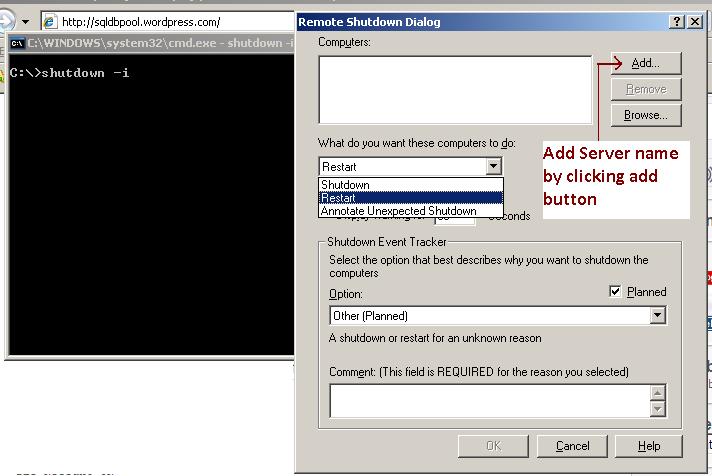
shutdown -i dos command to reboot/shutdown server remotely
[caption id="attachment_556" align="aligncenter" width="300" caption="shutdown -i command to reboot/shutdown server remotely"]
 [/caption]
Monday, March 29, 2010

Sunday, March 28, 2010
Trace Flag 3226
I have posted this article on DotNetSpider.com Please visit below link for more information.
http://www.dotnetspider.com/resources/37294-Trace-Flag.aspx
http://www.dotnetspider.com/resources/37294-Trace-Flag.aspx
Key Points in Disaster Recovery
I have posted this article on DotNetSpider.com. Please follow link.
http://www.dotnetspider.com/resources/37324-Key-Points-Disaster-Recovery.aspx
http://www.dotnetspider.com/resources/37324-Key-Points-Disaster-Recovery.aspx
Saturday, March 27, 2010
Script to fix and list out Orphan Users on all the databases on server
USE MASTER
GO
SET NoCount ON
DECLARE @VarDbId       INT,
        @SQL           nvarchar(4000),
        @VDBName       nvarchar(260),
        @OUCounter     INT,
        @Max_OUCounter INT
SELECT @VarDbId=4,
       @SQL    =''
CREATE TABLE #OrphaneUsers
             (
                          ID     INT IDENTITY (1,1) NOT NULL,
                          DBName VARCHAR(125) NULL          ,
                          UserName sysname NULL             ,
                          UserSID VARBINARY(85) NULL        ,
                          LoginExists bit NULL
             )
WHILE EXISTS
(SELECT database_id
FROM    sys.databases
WHERE   database_id>@VarDbId
AND     state_desc ='ONLINE'
)
BEGIN
        SELECT TOP 1
                 @SQL    ='Create table #OrphaneUser

(UserName sysname null,

UserSID varbinary(85) null )

insert into #OrphaneUser exec  ' + name+ '.dbo.sp_change_users_login ''report''

insert into #OrphaneUsers(DBName,UserName,UserSID,LoginExists) select '''+ name+''' as[dbname], UserName, UserSID,0 from #OrphaneUser

drop Table #OrphaneUser',
                 @VDBName=name
        FROM     sys.databases
        WHERE    database_id>@VarDbId
        AND      state_desc ='ONLINE'
        ORDER BY database_id
        EXEC SP_Executesql @SQL
        SELECT TOP 1
               @VarDbId=database_id
        FROM   sys.databases
        WHERE  database_id>@VarDbId
        AND    state_desc ='ONLINE'
END
UPDATE #OrphaneUsers
SET    LoginExists=1
FROM   #OrphaneUsers
       JOIN syslogins
       ON     #OrphaneUsers.UserName=syslogins.NAME
SELECT @OUCounter                   =0,
       @Max_OUCounter               =COUNT(0)
FROM   #OrphaneUsers
WHERE  LoginExists=1
WHILE EXISTS
(SELECT TOP 1
        id
FROM    #OrphaneUsers
WHERE   LoginExists=1
AND     id         >@OUCounter
)
BEGIN
        SELECT TOP 1
               @OUCounter=id
        FROM   #OrphaneUsers
        WHERE  LoginExists=1
        AND    id         >@OUCounter
        SELECT @SQL       ='EXEC '+DBName+'.dbo.sp_change_users_login ''Auto_Fix'', '''+UserName+''', NULL, '''+UserName+''''
        FROM   #OrphaneUsers
        WHERE  LoginExists=1
        AND    id         =@OUCounter
        EXEC SP_Executesql @SQL
        PRINT @SQL
END
SELECT *
FROM   #OrphaneUsers
DROP TABLE #OrphaneUsers
Subscribe to:
Posts (Atom)