select 'use ' + ltrim(rtrim(db_name(sd.dbid))) + char(13) + 'dbcc shrinkfile (' + quotename(ltrim(rtrim(sf.name)),'''') + ' ,truncateonly)' from sysaltfiles sf
inner join sysdatabases sd on sf.dbid = sd.dbid
where sd.dbid > 4Wednesday, April 14, 2010
Shrink SQL Server 2000 Database
Query to generate DBCC shrinkfile script for all the user databases in SQL Server 2000


Monday, April 12, 2010
How to check authentication scheme in SQL 2005/SQL 2008?
You can use below query to check authentication scheme whether it is Kerberos or NTLM.
select auth_scheme from sys.dm_exec_connections where session_id=@@spid
select auth_scheme from sys.dm_exec_connections where session_id=@@spid
Thursday, April 1, 2010
MVP Award
Dear Readers,
With your support and comments, I am announced as MVP
http://blogs.technet.com/southasiamvp/archive/2010/04/01/new-mvps-announced-april-2010.aspx

Thank You,
Jugal Shah
With your support and comments, I am announced as MVP
http://blogs.technet.com/southasiamvp/archive/2010/04/01/new-mvps-announced-april-2010.aspx
Thank You,
Jugal Shah
Wednesday, March 31, 2010
how to delete temporary files (*.tmp) and bak files (*.bak)
You can use below commands to delete temporary files and .BAK files from all the folders and sub-folders
To delete .tmp files
del *.tmp/f/s
To delete .bak files
del *.bak/f/s
To delete .tmp files
del *.tmp/f/s
To delete .bak files
del *.bak/f/s
SQL Server and Protocols
TCP/IP and Named Pipes
By default, clients have TCP and Named Pipes as available protocols on most of client computer. You can manipulate the protocol ordering by using the SQL Server Client utility. The client application uses the protocols in the order specified on the client computer. If you are using SQL Server 2005, the protocol order is stored in the ProtocolOrder registry entry under the following registry subkey:
HKEY_LOCAL_MACHINE\SOFTWARE\Microsoft\MSSQLServer\Client\SNI9.0
IPX/SPX
SQL Server 2005 does not support IPX/SPX. The newer versions of NetWare, such as NetWare 6.5, support TCP/IP which makes it the common protocol for all clients.
VIA
The Virtual Interface Adapter (VIA) can be used only by VIA hardware.
Shared Memory
Shared Memory can only be used on the local computer and cannot be used as a network protocol.
Reference: Microsoft SQL Server 2005 Books Online (2006), Index: client connections [SQL Server], about client network connections, choosing a network protocol
By default, clients have TCP and Named Pipes as available protocols on most of client computer. You can manipulate the protocol ordering by using the SQL Server Client utility. The client application uses the protocols in the order specified on the client computer. If you are using SQL Server 2005, the protocol order is stored in the ProtocolOrder registry entry under the following registry subkey:
HKEY_LOCAL_MACHINE\SOFTWARE\Microsoft\MSSQLServer\Client\SNI9.0
IPX/SPX
SQL Server 2005 does not support IPX/SPX. The newer versions of NetWare, such as NetWare 6.5, support TCP/IP which makes it the common protocol for all clients.
VIA
The Virtual Interface Adapter (VIA) can be used only by VIA hardware.
Shared Memory
Shared Memory can only be used on the local computer and cannot be used as a network protocol.
Reference: Microsoft SQL Server 2005 Books Online (2006), Index: client connections [SQL Server], about client network connections, choosing a network protocol
Number of articles and readers
Dear Readers,
With your help and support SQLDBPOOL has completed 150 technical articles and the readers stats reached 2,00,000 +, so please keep reading, post your comments, feedbacks and questions.


Thank you for your support.
Jugal Shah
With your help and support SQLDBPOOL has completed 150 technical articles and the readers stats reached 2,00,000 +, so please keep reading, post your comments, feedbacks and questions.


Thank you for your support.
Jugal Shah
Tuesday, March 30, 2010
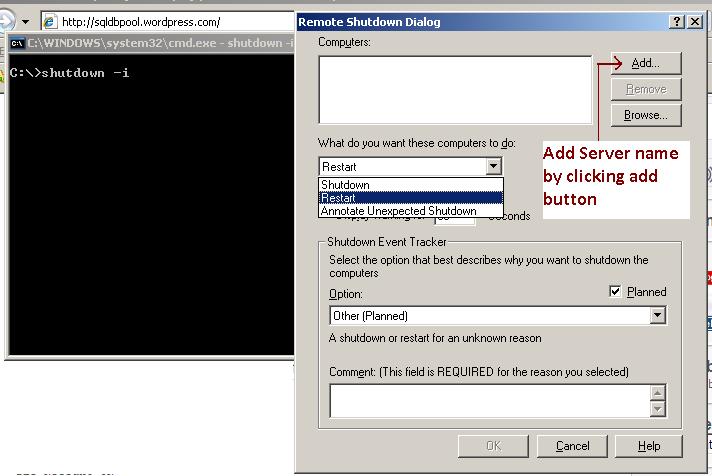
shutdown -i dos command to reboot/shutdown server remotely
[caption id="attachment_556" align="aligncenter" width="300" caption="shutdown -i command to reboot/shutdown server remotely"]
 [/caption]
Monday, March 29, 2010

Subscribe to:
Posts (Atom)