You can insert the data from one table to another table using SELECT INTO and INSERT INTO with SELECT.. FROM clause.
-- Below statement will create the temp table to insert records
select * INTO #tmpObjects from sys.sysobjects where type = 'u'
-- Below statement will create the user table to insert records.
-- First will create the table and insert it details as well in new table
select * INTO tmpObjects from sys.sysobjects where type = 'u'
--Below statement will insert new data into table
insert into tmpObjects SELECT * from sys.sysobjects where type = 's'
Thursday, January 6, 2011


Display the size of all tables in Sql Server 2005
You can use sys.SP_SpaceUsed stored procedure to get the size of all the tables.
--Inserting into temp table
INSERT INTO #temptable
(tablename,
numberofrows,
reservedsize,
datasize,
indexsize,
unusedsize)
EXEC Sp_msforeachtable @command1="EXEC sp_spaceused '?'"
SELECT *
FROM #temptable
-- drop the temporary table
DROP TABLE #temptable
[caption id="attachment_927" align="aligncenter" width="455" caption="Size of All the tables"] [/caption]
Below query will calulate the space of all the tables.
--create temp table to store the result
CREATE TABLE #temptable
(
tablename VARCHAR(100),
numberofrows VARCHAR(100),
reservedsize VARCHAR(50),
datasize VARCHAR(50),
indexsize VARCHAR(50),
unusedsize VARCHAR(50)
)
--create temp table to store the result
CREATE TABLE #temptable
(
tablename VARCHAR(100),
numberofrows VARCHAR(100),
reservedsize VARCHAR(50),
datasize VARCHAR(50),
indexsize VARCHAR(50),
unusedsize VARCHAR(50)
)
--Inserting into temp table
INSERT INTO #temptable
(tablename,
numberofrows,
reservedsize,
datasize,
indexsize,
unusedsize)
EXEC Sp_msforeachtable @command1="EXEC sp_spaceused '?'"
SELECT *
FROM #temptable
-- drop the temporary table
DROP TABLE #temptable
[caption id="attachment_927" align="aligncenter" width="455" caption="Size of All the tables"]
 [/caption]
Tuesday, January 4, 2011
Linked Server in SQL Server
A linked server configuration enables SQL Server to execute commands/T-SQL statements against OLE DB data sources on remote servers. You can query heterogeneous databases using linked server.
Advantage of Linked Server
Remote server access
You can execute distributed queries, updates, commands, and transactions on heterogeneous data sources using linked server
The ability to address diverse data sources similarly.
-- Below procedure will create linked server to communicate with access
Sp_addlinkedserver 'Lnk_AccessDB', 'Access', 'Microsoft.Jet.OLEDB.4.0',
'c:\db1.mdb'
-- query the linked server
SELECT *
FROM lnk_accessdb...tb1
-- Below query will drop the linked server
EXEC Sp_dropserver 'Lnk_AccessDB'
Advantage of Linked Server
Remote server access
You can execute distributed queries, updates, commands, and transactions on heterogeneous data sources using linked server
The ability to address diverse data sources similarly.
-- Below procedure will create linked server to communicate with access
Sp_addlinkedserver 'Lnk_AccessDB', 'Access', 'Microsoft.Jet.OLEDB.4.0',
'c:\db1.mdb'
-- query the linked server
SELECT *
FROM lnk_accessdb...tb1
-- Below query will drop the linked server
EXEC Sp_dropserver 'Lnk_AccessDB'
GO Keyword with Integer Parameter
In SQL Server the keyword GO tells SQL Server to execute the preceding code as one batch. From SQL Server 2005 onwards we can specify the integer parameter with GO keyword which will loop the preceding statement.
Example
Example
|
SSMS T-SQL Batch Separator
It is often asked by the people can we change the batch separator T-SQL. Answer is yes we can change the batch separator.
We can do it by Tools->Options->Query Execution->SQL Server->General->Batch separator

We can do it by Tools->Options->Query Execution->SQL Server->General->Batch separator

Monday, January 3, 2011
Backup Start Date Time and Finish Date Time
As best practice it is recommended that you have to backup date time with the backup file name so anyone can get the idea of Backup creation.
Sometimes due some issue we took backup without specifying the datetime with the backup file name so during restore we are unsure that how much data backed up in the backup file, type of backup, Is it Copy only and more.
SQL Server stores the Backup Metadata into backup header. You can restore header only command to get the required information.
RESTORE headeronly FROM disk = 'c:\jshah.bak'
Sometimes due some issue we took backup without specifying the datetime with the backup file name so during restore we are unsure that how much data backed up in the backup file, type of backup, Is it Copy only and more.
SQL Server stores the Backup Metadata into backup header. You can restore header only command to get the required information.
RESTORE headeronly FROM disk = 'c:\jshah.bak'
| Column Name | Values | Description |
| BackupName | NULL | |
| BackupDescription | NULL | |
| BackupType | 1 | Backup type: 1 = Database 2 = Transaction log 4 = File 5 = Differential database 6 = Differential file 7 = Partial 8 = Differential partial |
| ExpirationDate | NULL | |
| Compressed | 0 | 0 = Un-Compressed Backup 1 = Compressed Backup |
| Position | 1 | |
| DeviceType | 2 | |
| UserName | JShah | |
| ServerName | SQLDBPool | |
| DatabaseName | jshah | |
| DatabaseVersion | 655 | |
| DatabaseCreationDate | 12/31/10 9:55 AM | |
| BackupSize | 1453056 | |
| FirstLSN | 28000000006000100 | |
| LastLSN | 28000000013000000 | |
| CheckpointLSN | 28000000006000100 | |
| DatabaseBackupLSN | 0 | |
| BackupStartDate | 12/31/10 10:06 AM | |
| BackupFinishDate | 12/31/10 10:06 AM | |
| SortOrder | 52 | |
| CodePage | 0 | |
| UnicodeLocaleId | 1033 | |
| UnicodeComparisonStyle | 196609 | |
| CompatibilityLevel | 100 | |
| SoftwareVendorId | 4608 | |
| SoftwareVersionMajor | 10 | |
| SoftwareVersionMinor | 0 | |
| SoftwareVersionBuild | 2757 | |
| MachineName | SQLDBPool | |
| Flags | 512 | 1 = Log backup contains bulk-logged operations. 2 = Snapshot backup. 4 = Database was read-only when backed up. 8 = Database was in single-user mode when backed up. 16 = Backup contains backup checksums. 32 = Database was damaged when backed up, but the backup operation was requested to continue despite errors. 64 = Tail log backup. 128 = Tail log backup with incomplete metadata. 256 = Tail log backup with NORECOVERY. |
| BindingID | 85A5505D-ADB1-4B33-A181-549DC520A0F8 | |
| RecoveryForkID | 03DE5437-1E27-4885-9011-91CFED12338A | |
| Collation | SQL_Latin1_General_CP1_CI_AS | |
| FamilyGUID | 03DE5437-1E27-4885-9011-91CFED12338A | |
| HasBulkLoggedData | 0 | 1 = Yes 0 = No |
| IsSnapshot | 0 | 1 = Yes 0 = No |
| IsReadOnly | 0 | 1 = Yes 0 = No |
| IsSingleUser | 0 | 1 = Yes 0 = No |
| HasBackupChecksums | 0 | 1 = Yes 0 = No |
| IsDamaged | 0 | 1 = Yes 0 = No |
| BeginsLogChain | 0 | 1 = Yes 0 = No |
| HasIncompleteMetaData | 0 | 1 = Yes 0 = No |
| IsForceOffline | 0 | 1 = Yes 0 = No |
| IsCopyOnly | 0 | 1 = Yes 0 = No |
| FirstRecoveryForkID | 03DE5437-1E27-4885-9011-91CFED12338A | |
| ForkPointLSN | NULL | |
| RecoveryModel | FULL | |
| DifferentialBaseLSN | NULL | |
| DifferentialBaseGUID | NULL | |
| BackupTypeDescription | Database | |
| BackupSetGUID | 62EB4399-C119-42C2-91F1-BF0FF19CB896 | |
| CompressedBackupSize | 1453056 |
Sunday, January 2, 2011
How many databases can be mirrored on a single instance of Microsoft SQL Server?
It is frequently asked by the DBAs or SystemAdmins or Customer that how many databases can be mirrored on a single instance of Microsoft SQL Server?
Answer of the above question is you can configure 10 databases for 32-bit operating system.On a 32-bit system, database mirroring can support a maximum of about 10 databases per server instance because of the numbers of worker threads that are consumed by each database mirroring session.
For 64-Bit Operating system you can mirror more than 10 databases depending on the number of processors and worker threads. Many company has deployed more that 10 Databases as mirrored.
Answer of the above question is you can configure 10 databases for 32-bit operating system.On a 32-bit system, database mirroring can support a maximum of about 10 databases per server instance because of the numbers of worker threads that are consumed by each database mirroring session.
For 64-Bit Operating system you can mirror more than 10 databases depending on the number of processors and worker threads. Many company has deployed more that 10 Databases as mirrored.
Saturday, January 1, 2011
2010 in review
Summary of how we did in year 2010

The Blog-Health-o-Meter™ reads Wow.


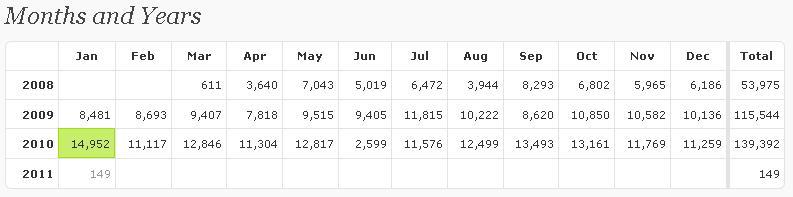
The Louvre Museum has 8.5 million visitors per year. This blog was viewed about 140,000 times in 2010. If it were an exhibit at The Louvre Museum, it would take 6 days for that many people to see it.
In 2010, there were 81 new posts, growing the total archive of this blog to 220 posts. There were 46 pictures uploaded, taking up a total of 5mb. That's about 4 pictures per month.
The busiest day of the year was January 25th with 1709 views. The most popular post that day was Happy Republic Day.
The top referring sites in 2010 were google.co.in, google.com, en.wordpress.com, stackoverflow.com, and yandex.ru.
Some visitors came searching, mostly for sql server 2005 interview questions, republic day, dba responsibilities, error 18456, and system databases in sql server 2005.
These are the posts and pages that got the most views in 2010.
Happy Republic Day January 2009
6 comments
How to change SQL Server Instance Name? September 2008
4 comments
SQL Server 2005 Interview Questions May 2008
62 comments
SQL Server 2008 Active-Passive/Active-Active Cluster Installation October 2009
14 comments
DBA Roles and Responsibilities December 2008
46 comments
The Blog-Health-o-Meter™ reads Wow.
Crunchy numbers

The Louvre Museum has 8.5 million visitors per year. This blog was viewed about 140,000 times in 2010. If it were an exhibit at The Louvre Museum, it would take 6 days for that many people to see it.
In 2010, there were 81 new posts, growing the total archive of this blog to 220 posts. There were 46 pictures uploaded, taking up a total of 5mb. That's about 4 pictures per month.
The busiest day of the year was January 25th with 1709 views. The most popular post that day was Happy Republic Day.
Where did they come from?
The top referring sites in 2010 were google.co.in, google.com, en.wordpress.com, stackoverflow.com, and yandex.ru.
Some visitors came searching, mostly for sql server 2005 interview questions, republic day, dba responsibilities, error 18456, and system databases in sql server 2005.
Attractions in 2010
These are the posts and pages that got the most views in 2010.
1
Happy Republic Day January 2009
6 comments
2
How to change SQL Server Instance Name? September 2008
4 comments
3
SQL Server 2005 Interview Questions May 2008
62 comments
4
SQL Server 2008 Active-Passive/Active-Active Cluster Installation October 2009
14 comments
5
DBA Roles and Responsibilities December 2008
46 comments
Articles Posted on MSSQLTips.com
| Database Administration |
|
| Dynamic Management Views\Functions |
| Monitoring |
| Security |
|
| SQL Server Management Studio |
| Tools |
KILL SQL Server 2000 Blocking SPID and Records it details
Problem
Today I got an email from one of my blog reader; they have an application developed with VB6.0 and SQL Server 2000. Application was developed long back and now their database size is increased as well. Due un-efficient coding they are getting blocking issue and stuck all their application transactions. He asked for writing a query which will execute by SQL Server Agent at every 1 minute and will KILL the culprit SPID. He also wants me to store the KILL transaction history as well.
As a solution I have written below query for him and which working fine now.
Today I got an email from one of my blog reader; they have an application developed with VB6.0 and SQL Server 2000. Application was developed long back and now their database size is increased as well. Due un-efficient coding they are getting blocking issue and stuck all their application transactions. He asked for writing a query which will execute by SQL Server Agent at every 1 minute and will KILL the culprit SPID. He also wants me to store the KILL transaction history as well.
As a solution I have written below query for him and which working fine now.
-- Create below table in master database |
Subscribe to:
Posts (Atom)